
Check the import first
Review customer rows and totals before using an uploaded report.
CREDIT CONTROL FOR SMALL BUSINESSES
Turn your ageing report into a daily collection worklist. Review overdue accounts and choose the next call. Keep notes, promises and assigned next actions against uploaded accounts.
No card required · No automatic charge · Your own company workspace
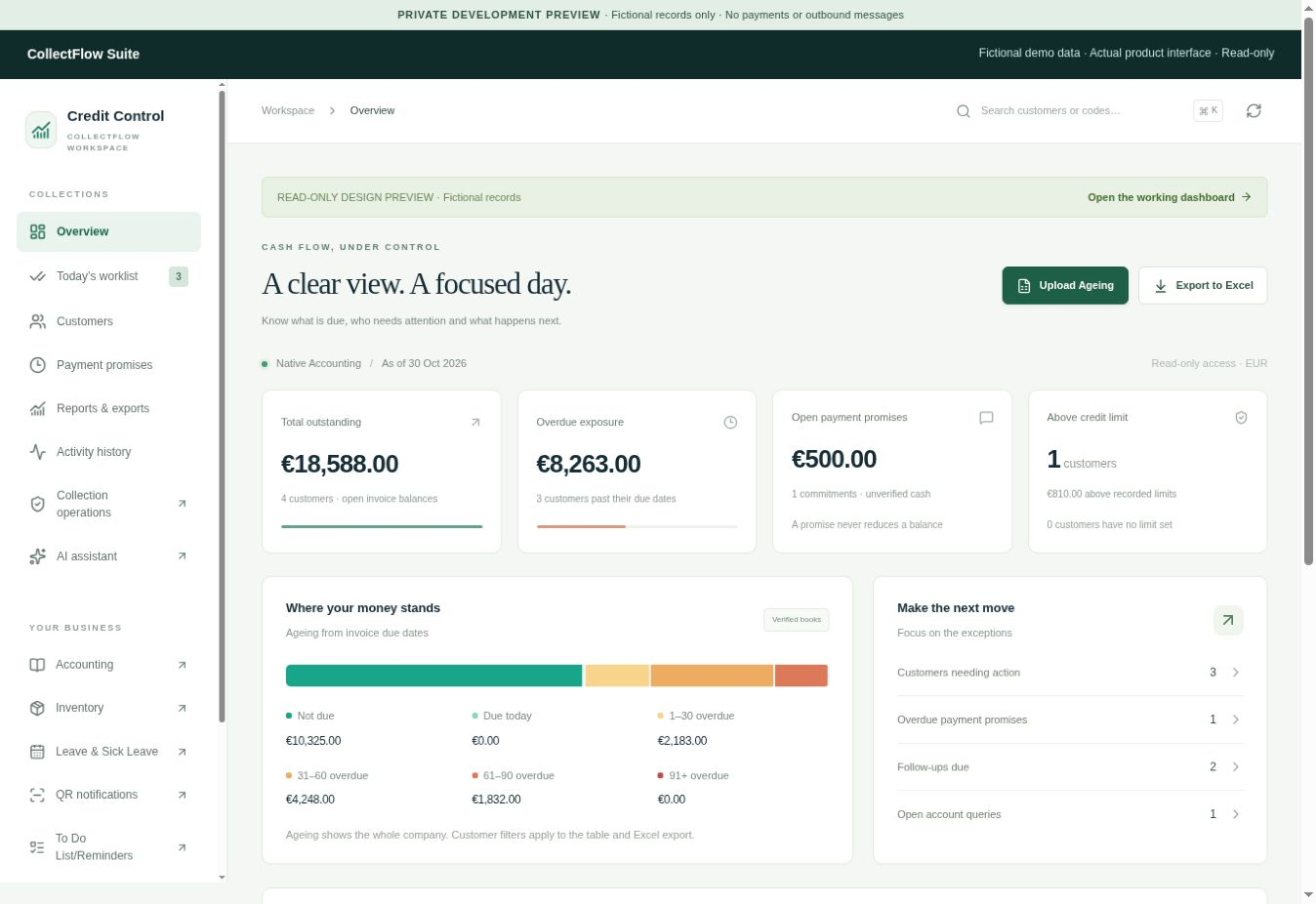
Late payers put pressure on cash flow. Keep overdue balances and the next follow-up in view, so the next call has a purpose.
HOW IT WORKS
Know which account needs attention and keep a record of what your team agreed.
Explore Credit ControlImport an Excel or CSV file, check the customer rows and totals, then approve it.
Review overdue accounts by amount and priority. Open any customer to inspect the source balances and priority reason.
Log calls, promises and next actions against uploaded accounts, then assign follow-ups to your team. A promise is never money received.
BUILT FOR THE FOLLOW-UP
Uploaded ageing is its own source. Notes and promises never reduce a debt. Future-dated cheques remain separate until honoured.
Review customer rows and totals before using an uploaded report.
Record conversations, queries, promises and next actions for colleagues with permission.
Collection email and WhatsApp are draft/simulation workflows. They do not send messages to debtors or sync replies.
ALSO INCLUDED
Credit Control is the starting point. These additional modules have their own permissions and service limits. Accounting & Inventory is beta.
Record requests, decisions and balances. Leave-only logins do not use paid seats.
See scope and limitsExplore invoices, bookkeeping and stock with fictional data while independent financial validation is pending.
See scope and limitsCollect a customer’s reported payment details for review. A notification does not settle funds.
See scope and limitsKeep tasks, notes and next actions in the company workspace. Device reminders require permission.
See scope and limitsYOUR COMPANY WORKSPACE
Owners manage their own staff. Module permissions control access. Leave-only logins are excluded from paid-user allowances and do not have To-Do or financial access.
Individual passwords, optional authenticator protection and saved offline recovery codes.
Membership and company checks apply to requests for your workspace records.
The trial starts when your company is created. No card is collected and no automatic charge follows.
MONTHLY PLANS
Self-service setup is free; assisted onboarding is optional. The 14-day pilot is free. New paid checkout is paused while launch details are completed. No automatic charge follows.
Free 14-day pilot · future monthly plans. No card or payment is required. New checkout is paused while launch details are completed; the amounts below are future paid-plan prices, not a charge at trial expiry.
WORKING ON YOUR OWN
€29/ month
Up to 2 paid users
One company, including its owner.
Assisted setup: ask us.
Start 14-Day Free TrialA FOCUSED TEAM
€69/ month
Up to 5 paid users
One company, including its owner.
Assisted setup: ask us.
Start 14-Day Free TrialA GROWING TEAM
€119/ month
Up to 15 paid users
One company, including its owner.
Assisted setup: ask us.
Start 14-Day Free TrialA WIDER TEAM
€239/ month
Up to 30 paid users
One company, including its owner.
Assisted setup: ask us. Capacity review before a large rollout.
Start 14-Day Free TrialSolo €29, Small €69, Medium €119 and Large €239 per month. We welcome pilot feedback on the workflow and value. Read the pricing and renewal details →
SEE IT BEFORE YOU SIGN UP
60-second captioned screen walkthrough · captured product screens · fictional records · no audio. This recording shows the earlier hosted workflow, with its final step in Accounting (beta). New uploads use Private encrypted workspace, including locally encrypted notes, promises and follow-ups.
EXPERIENCE FROM THE PILOT
No testimonials have been approved for publication yet. This section will show genuine pilot feedback only after permission and review.
BEFORE YOU START
Private encrypted workspace accepts Excel (.xlsx or .xls) and CSV ageing reports up to 2 MB, or ordinary encrypted files up to 5 MB. Review the rows locally before saving; each approved report is a separate encrypted item.
Collection email and WhatsApp are currently draft and simulation tools, with no live debtor mailbox or reply sync. Registration and trial notices use a separate configured transactional email service; provider acceptance does not guarantee inbox arrival.
Business records and uploads use Cloudflare’s database and file storage, with access controlled by company membership and permissions. EU-only storage has not been confirmed for this deployment; read the storage and access details.
New files and reports in Private encrypted workspace are encrypted on your device using your company’s recovery key; that key is not sent to the server. Your own company owner/accountant needs both authorised access and that key, while old hosted records and other manual modules remain outside this protection. Read the access boundary, recovery responsibilities and trusted-software limit.
Payments cover one month and renew manually, so stop making renewal payments to end access at the paid-through date. Refunds need separate review, and expiry does not automatically delete records.
No card is collected and no automatic charge follows. Pilot module access ends at the trial date; account security, feedback and data requests remain available. New paid checkout is currently paused, and expiry does not automatically delete records.
No: choose the Leave only role in Team & permissions. Active roles with To-Do or financial access still count, while disabled memberships do not.
Future monthly prices are Solo €29, Small €69, Medium €119 and Large €239. The current 14-day pilot is free and new checkout is paused; no automatic charge follows.
Yes. Uploaded accounts support notes, dated promises, assigned collectors and next actions with a shared history; a promise never reduces the balance.
Live debtor mailbox connections and integrations with external accounting software are planned for later evaluation. Pilot feedback will guide which providers to support first; no release date is promised.
Accounting & Inventory is beta. Evaluate with fictional records while independent financial and tax validation is pending.
START WITH YOUR NEXT COLLECTION CALL
Start a 14-day trial in your company workspace.